¶ WebDisk Send — help
WebDisk Send is the simplest way to send a large file. You upload the file, you get a ready-made link, and you send it to whoever you like — and the recipient downloads the file without creating an account. After a period that depends on your plan, the file deletes itself.
¶ Where to start
- 🚀 How to send a file — upload a file, set the link options, send it and manage the transfers you have already sent.
- 💼 Plans and limits — the free and the paid plan, downloads, retention, invoices and cancelling.
- ❓ Frequently asked questions (FAQ) — accounts, disappearing files, security, closing your account.
- 💰 Pricing — the current limits and prices for both plans (in Polish: send.webdisk.io/pricing).
- 📘 In-app guide — "How WebDisk Send works", available without signing in.
¶ What the panel looks like
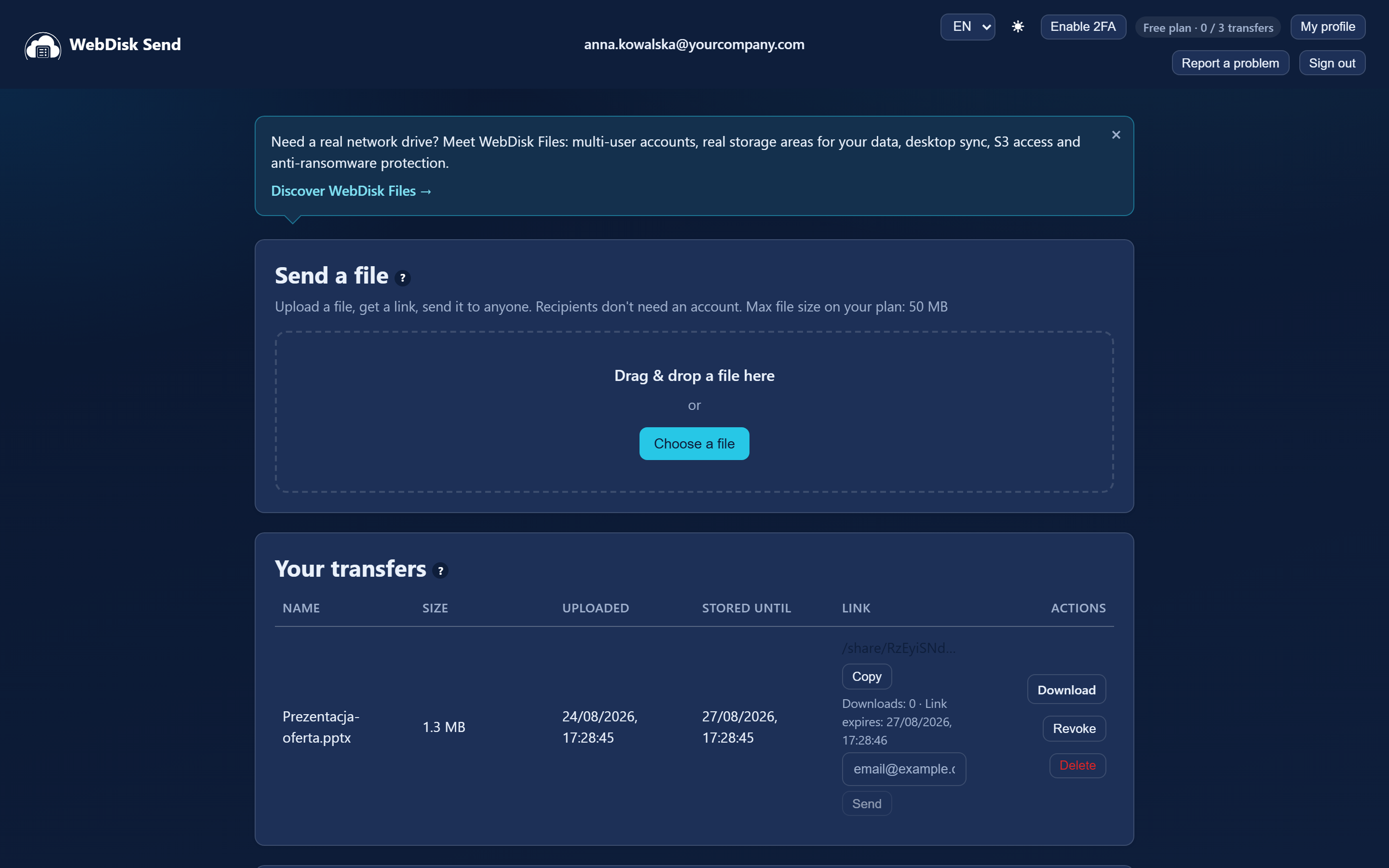
The service lives at a single address: https://send.webdisk.io. Once you sign in, you will see four cards one below the other — "Send a file", "Your transfers", "Subscription" and "Invoices".
The top bar holds the language switcher, the light/dark theme switcher, the "Enable 2FA" button, a badge showing your plan name together with a counter of the transfers used this month, and the "My profile", "Report a problem" and "Sign out" buttons.
¶ In brief — what Send can do
| Feature | What it is for |
|---|---|
| Send a file by link | Upload a file and you get a link to copy and send on. |
| Downloading without an account | The recipient clicks the link and downloads — nothing to register, nothing to install. |
| We e-mail it for you | You type in the recipients' addresses and we send them a standard WebDisk message with the file name and the link. There is no field for a note of your own. |
| Password on the link | The recipient types a password before downloading. |
| Expires after | You give a number of hours after which the link stops working. An empty field means the link never expires on its own. |
| Download limit | For example "at most 5 downloads" on this link. |
| Revoking and deleting | You can revoke a link at any moment, and delete the file straight away instead of waiting for retention. |
| Automatic deletion | Files disappear after a number of days that depends on your plan (retention) — the date is in the "Stored until" column. |
| A free and a paid plan | The paid plan means a bigger file, more downloads and longer storage. |
| VAT invoices | Once invoicing is switched on, your invoices wait in the panel in the "Invoices" card, ready to download as PDF. |
| Four languages | The panel and our messages come in Polish, English, Ukrainian and German. |
| Two-factor sign-in (2FA) | An extra code from an app on your phone when you sign in. |
💡 Not sure where to begin? Go to How to send a file.
⚠️ Send is for sending files temporarily. If you need permanent storage with folders, have a look at WebDisk Files.