¶ Your WebDisk account
At WebDisk you have one account — your email address. The same address and password sign you in to WebDisk Files, Send, VM and Nextcloud. You don't set up a separate account for each product: buying another service simply adds it to the account you already have.
💡 In short: your password is shared across all WebDisk services. In Files and Send you change it in the profile window. VM and Nextcloud have no such form — there you set a new password through password recovery. If you can't remember your password, reset it on the sign-in screen of the service where you created your account.
¶ At a glance — what's on your account
| Topic | How it works |
|---|---|
| One sign-in | The same email and password for Files, Send, VM and Nextcloud. |
| Changing your password | Files and Send: profile window → "Change password" (you enter your current password). VM and Nextcloud: through password recovery. After a change we sign you out of every service on every device. |
| Resetting your password | On the sign-in screen of the service where the account was created. The link works once: 72 hours in Files and Send, 48 hours in VM and Nextcloud. |
| Two-factor sign-in (2FA) | Files and Send: the "Enable 2FA" button in the panel's top bar. VM and Nextcloud: the 2FA section in the profile window. The code comes from an app on your phone. We do not issue backup codes. |
| Invoices | The "Invoices" section — in Send, VM and Nextcloud inside the service panel, in Files inside the Organization panel. Downloadable as PDF. |
| Your data (GDPR) | Files and Send: "Export my data (GDPR)" → "Request export". VM and Nextcloud: "Download my data (JSON)" straight from the panel. |
| Closing your account | In the profile window, in the account-closure section. You have 30 days to change your mind. |
¶ One account, many services
- Your login is your email address. The same address cannot belong to two WebDisk accounts.
- Which services you use is recorded against your account. Each service's panel shows only what belongs to it.
- While you are signed in to one service, moving to another usually doesn't ask you to sign in again.
- You open the profile window from the panel's top bar — the button is called "Profile" (in Send: "My profile").
⚠️ Accounts created before we joined the services together may still carry different passwords in different panels. If one service accepts a different password from the rest, set the password again in the service where the account was created — from then on there will be a single, shared one.
¶ Creating an account
There are two routes, depending on the service:
- WebDisk Send — you fill in the registration form: email address, password (twice) and acceptance of the Terms. You then confirm the address by clicking the link in the message we send — it is valid for 24 hours. There is no separate "resend" button: to get a new link, submit the registration form again with the same address.
- Files, VM and Nextcloud — you don't create the account up front. You place an order (email address, billing details) and pay, and the link for setting your password arrives by email. The link works once and is valid for 72 hours in Files and 48 hours in VM and Nextcloud. If it expires, use the password reset on the sign-in screen.
Whichever route you take:
- Give us your own, working email address. We reject disposable addresses, domains that mail cannot be delivered to, and sign-ups from anonymising networks (Tor, some VPNs). Registration is also protected by an automatic browser check.
- In Gmail, dots in the address make no difference —
a.b@gmail.comandab@gmail.comare one mailbox, so for us one address. The same goes for a+alias (for examplejan+webdisk@…) at the large providers that support it (Gmail, Outlook/Hotmail, iCloud, Proton and others): it leads to the same mailbox and counts as the same address. - If you see "An account with this e-mail address already exists." or "An account already exists for this mailbox. Please sign in or reset your password." — it means you already have an account on that mailbox. Sign in to it rather than creating a second one.
¶ Your password
¶ Changing your password when you know it
In Files and Send:
- Sign in to the panel.
- In the top bar, open "Profile" (in Send: "My profile").
- In the "Change password" section, enter your current password, then your new password twice, and save.
In VM and Nextcloud the profile window has no change-password form — it only tells you that the password is shared across all WebDisk services, and links to password recovery. Use that, as described below.
⚠️ Changing your password signs you out everywhere — on every device and in every WebDisk service. It takes effect with a slight delay, up to about a minute. Sign in again with the new password.
¶ I can't remember my password
- Go to the sign-in screen of the service where you created your account.
- Click the forgotten-password link — in Files and Send it reads "Forgot your password?", in VM and Nextcloud "Forgot password?".
- Enter your account's email address and confirm.
- Check your inbox and click the link in the message. The link works only once: it is valid for 72 hours in Files and Send, 48 hours in VM and Nextcloud.
- Type your new password twice and save. That's it — it now works across all your WebDisk services.
⚠️ Reset your password where you created your account. A reset started in another service in the family changes the password in that one service only, leaving the old one in place everywhere else — so you end up with two different passwords instead of one.
💡 No message? For security reasons the form always shows the same confirmation, even when the address isn't in our records — so check that you are typing exactly the address you created the account with, and look in your Spam / Promotions folder.
¶ A good password
- At least 8 characters — but the longer, the better. A phrase made of a few words works very well, for example green-lamp-reads-a-book.
- Don't reuse a password you already use on other websites.
¶ Two-factor sign-in (2FA)
Once 2FA is on, after your password you enter a one-time 6-digit code from an app on your phone (Google Authenticator, Authy and the like). It is the most effective protection your account can have — it works even if someone learns your password. We recommend it.
In Files and Send:
- Sign in to the panel.
- In the top bar, click "Enable 2FA".
- In the "Two-factor authentication (2FA)" window, click "Enable 2FA" and scan the QR code with the app on your phone (or copy the value from the "Setup key" field into it by hand).
- Type the code the app shows into the "6-digit code" field and confirm with "Verify & enable".
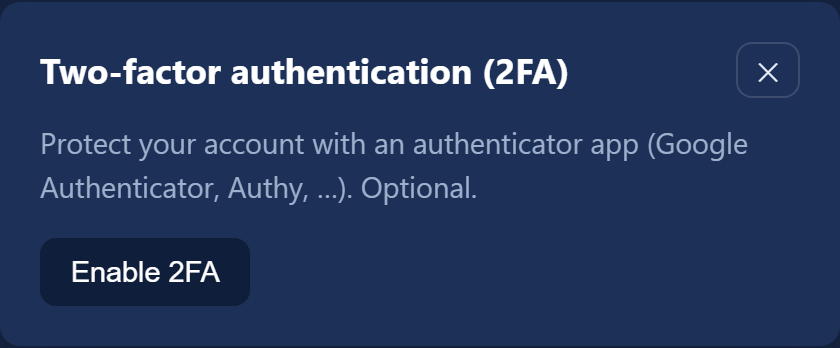
In VM and Nextcloud you'll find the same mechanism in the profile window, in the two-factor authentication section. The button that switches it on has the same name — "Enable 2FA" — but the fields carry shorter labels: "Secret" instead of "Setup key", "Code" instead of "6-digit code", and you confirm with "Verify and enable".
2FA covers your whole WebDisk account — once it is on, you'll need a code when signing in to every one of your services.
⚠️ We do not issue backup codes. If you lose the phone with the app on it, you won't be able to sign in and you can't switch 2FA off yourself — only we can do that. Resetting your password won't help: 2FA stays on after a new password is set as well. As you won't be able to get into the panel, write to support@webdisk.io. Before that ever happens, it is worth saving the setup key (the same one hidden behind the QR code) somewhere safe, such as a password manager — it lets you restore the codes on a new phone.
¶ Sign-in problems
Sign-in fails even though the password is right.
After a run of failed attempts, sign-in is blocked for a while. Wait fifteen minutes or so and try again.
I keep having to sign in again.
After roughly an hour without using the panel your session expires and we ask you to sign in again. Every click in the panel extends that time.
I signed in on someone else's computer and forgot to sign out.
There is no "sign out everywhere" button, but there is something simpler: change your password (in VM and Nextcloud — set it again through password recovery). Changing the password ends every session on every device and in every WebDisk service.
¶ Payments and invoices
You'll find your VAT invoices in the panel of the service they relate to — the "Invoices" section, downloadable as PDF. In Files that section sits in the Organization panel, that is with the person who bought the service.
⚠️ We issue an invoice only if you fill in your company details (including the tax ID) before payment and tick the VAT invoice request in your profile — the label differs slightly between panels. Without that, there will be no invoice for that payment.
Subscription details (next charge date, changing your plan, cancelling) live in the same panel, in the subscription section: Files, Send, VM, Nextcloud.
¶ Your data and closing your account
A copy of your data (GDPR, Art. 15 and 20).
- In Files and Send, open the profile window, the "Export my data (GDPR)" section, and click "Request export". We'll build the archive and email you a download link. At most one export every 7 days; the link is valid for 14 days.
- In VM and Nextcloud the profile window has a "Download my data (JSON)" button — the file downloads straight away.
Either way you get a description of what we hold about you. The contents of your files are not included — you download those from the panel as usual.
Closing your account (GDPR, Art. 17). Every service's profile window has an account-closure section (the "Close account…" button in Files and Send, "Close my account" in VM and Nextcloud). Once you confirm, your profile and data are permanently deleted 30 days later. During that window you can change your mind — sign in again and click the button that undoes the closure ("Cancel deletion", in VM "Cancel account closure", in Nextcloud "Cancel deletion — keep my account").
Three things worth knowing before you start:
- Closure applies to the service you request it in. If you use several WebDisk services, request it in each one separately.
- In WebDisk VM you must first cancel all your servers — while one is still running, the panel won't let you close the account.
- In WebDisk Files the person who bought the service (the organization administrator) doesn't close their own account from the profile — they close the whole organization from the Organization panel, together with the user accounts.
⚠️ Once the 30 days are up, the deletion cannot be undone. If you want to keep your files, download them before closing the account.
¶ Staying safe
- WebDisk never asks for your password — not by email, not by phone. Such a request is always an attempted fraud; don't reply to it, and do let us know.
- Before you click a link in a message, check where it leads. Don't go by the sender's name alone.
- Turn on 2FA and use a different password from the ones on your other websites.
- Contact: support@webdisk.io (support, including when you can't sign in) and iod@webdisk.io (data protection matters). You can check the current status of our services at status.webdisk.io.
¶ Are you a WebDisk employee?
Signing in to the internal management panels works differently and is covered on a separate page: Password for WebDisk management services.
💡 This page is also available in Polish — the language switcher is in the top-right corner.